
Appearance
Rack specs and storage systems
Why it matters
This is the step that turns a coloured rectangle into thousands of counted pallet positions. It takes two things: a rack spec that describes one bay, and a storage system that lays bays across a zone.
In plain words
- A rack spec is the catalogue page for a rack: "2.7 m bays, 4 levels, beams at 1.6 m, 2 pallets a bay". It knows nothing about where it goes.
- A storage system is a decision: "fill the Reserve zone with that spec, rows running east–west, the Wall to wall pattern, a cross aisle every 8 bays".
Keeping them apart means one spec can be reused in many zones, laid single in one and back to back in another.
In Warehouse Studio
1. Create a rack spec
- On Storage & Equipment, click Rack library. The library has two tabs, Browse and Create.
- On Create, choose a Preset (populates the form). The built-in presets are:
- Selective · 2-pallet bay
- Selective · 3-pallet bay
- Selective · 6-level (VNA-ready)
- Double-deep · 2-wide
- Block stack · 4-deep, 3-high
- Shelving · longspan 1200 × 600, 5 shelves
- Floor positions · 1200 module, 2 deep
- Adjust the fields:
| Field | Meaning |
|---|---|
| Name | What you will call it, for example Selective 4 high. |
| Storage system type | Selective, Double-deep, Block stack, Shelving or Floor positions. |
| Bay width (mm) / Bay depth (mm) | The bay's clear opening and depth. |
| Upright width (mm) / Upright depth (mm) | The frame's size. |
| Levels | How many shelf heights, including the floor. |
| Pallets / bay | Pallets side by side on one level. |
| Beam heights (mm, comma-sep, one per level) | Where each level's beam sits. |
| Longitudinal flue (mm) / Transverse flue (mm) | The gaps for fire safety. |
Block stack and floor positions add Lane depth (pallets), Pallet depth (mm) and Gap between pallets (mm). Double-deep adds its front and rear depths.
- Click Create rack spec. It is now listed on Browse. Save to library makes it available to every scenario in the project.
2. Lay it out: the storage system
- Click Storage system.
- Fill in:
| Field | Meaning |
|---|---|
| Storage zone | Which zone to fill. |
| Rack spec | Only specs the zone allows are listed. |
| Lay pattern | Auto (recommended), one of the five presets, Custom… (type your own, such as R A RR A RR A R), or Edges (choose what starts and ends the pattern). |
| Row direction | X (along width) or Y (along depth). |
| Working aisle width (mm) | Or From vehicle… to size it from a forklift. |
| Cross-aisle every (bays) / Cross-aisle width (mm) | Breaks long rows so forklifts can cross. |
| Start position | Where the pattern is anchored: the zone's start, end or centre, a structural grid line, a wall face, or a point. |
| Columns | What to do with a column in the way: Avoid (clip rows), Within footprint (suppress), Between uprights, In rear flue, In aisles, or Auto (least lossy). |
- Confirm. The racking draws into the zone, and the platform reports the rows, bays, positions and occupied area.
Flue check opens the same dialog to check AS 4084 flue spacing first. Offending rows are highlighted.
3. Change your mind
Select the storage system in Objects (it sits under its zone) and edit it. Change the zone's shape and the racking regenerates on its own. If a change would leave no rows at all, the platform refuses it and keeps what you had, rather than deleting your racking.
Compare alignments on the Analysis tab, shown when a storage system is selected, tries several start positions and shows how many positions each gives.
What you get back
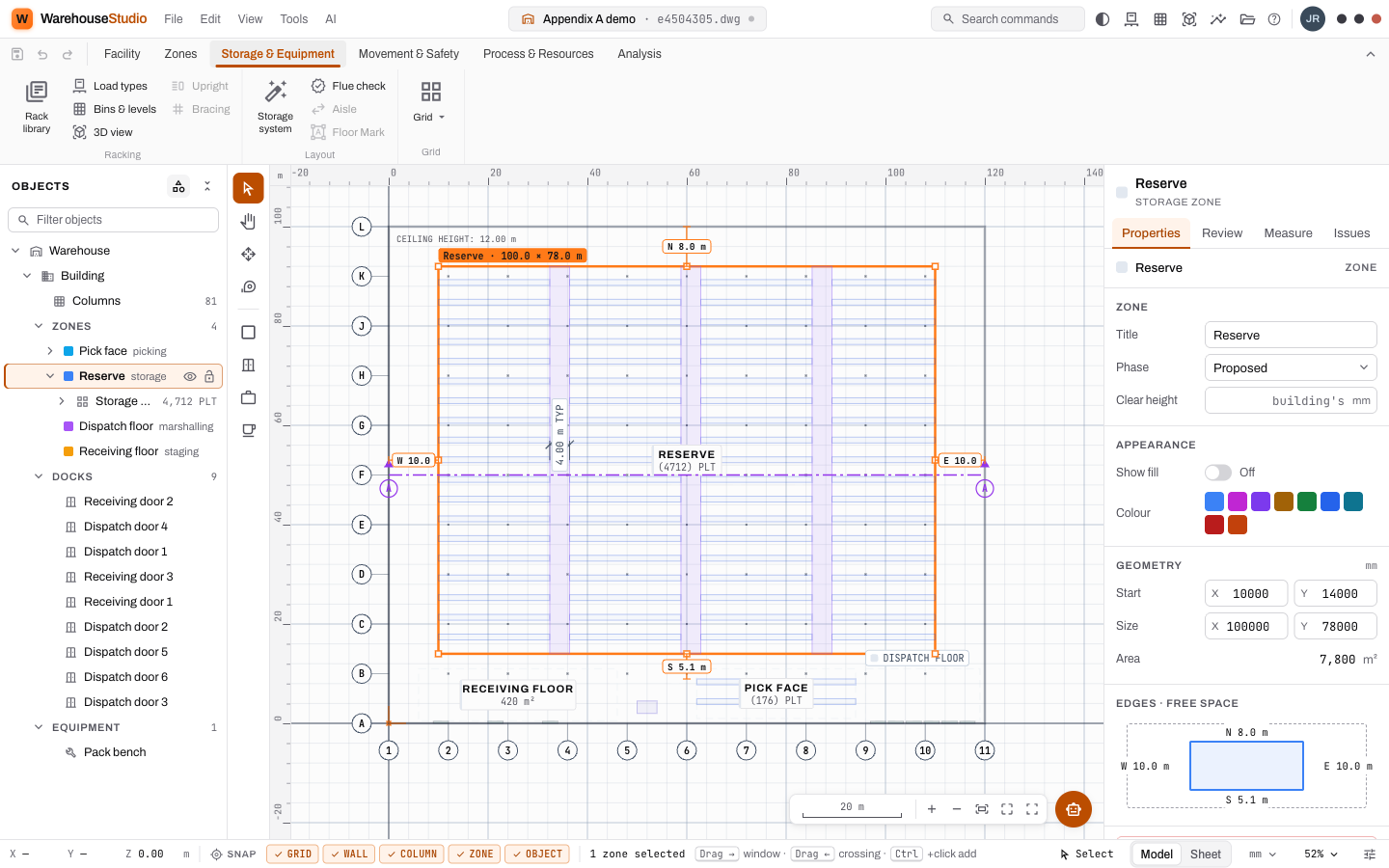
The demo's Reserve zone, 100 × 78 m, with the Selective 4 high spec, a 4 m cross aisle every 8 bays, gives 76 rows and 4 712 pallet positions.
Try it
In Sandbox, create a spec from Selective · 2-pallet bay with 4 levels, then a storage system in your storage zone with Auto and a cross aisle every 8 bays. Note the position count. Then change the pattern to Single rows and see how many positions that costs.
Words you just learned
Rack spec · preset · storage system · row direction · working aisle · cross aisle · start position · column strategy · Engineering Library.