
Appearance
Operating profiles
Why it matters
The drawing says what the warehouse is. Profiles say what it does: when it works, what arrives, what is ordered, who does the work. Without profiles there is nothing to estimate and nothing to run.
In plain words
A profile is a short, structured description of one part of the operation. There are six kinds, one tab each on the Simulate page:
| Tab | Profile | Answers |
|---|---|---|
| Calendar | One per scenario | When does the warehouse work? |
| Inbound | Truck profiles | What arrives, how often, carrying what? |
| Flow | One per scenario | What happens to a pallet after unloading, before put-away? |
| Outbound | Order types | What do customers order, and when must it leave? |
| Products | Product groups | How are goods packed and stored? |
| Resources | Resource pools | Who and what does the work? |
Open the Simulate page from Process & Resources ▸ Simulation, or Tools ▸ Simulate….

The rail on the left shows each tab's status: Set or a count of profiles. At its foot, Labour estimate needs ticks off what the estimate requires.
Every profile says where its numbers came from
The top of every profile carries its provenance:
| Provenance | Means |
|---|---|
| Assumed | A reasonable guess. The default. |
| Benchmark | From industry figures or a similar site. |
| Observed | Measured on the real site. |
| Calibrated | Tuned so the simulation matches the real site. |
Add Estimated on, Confidence and a Note. A run's report counts how many of its inputs were assumed. This is how a figure keeps its honesty all the way to the client.
Numbers that vary: distributions
Real numbers are not fixed. "About 12 trucks a day" might be 9 on Monday and 15 on Tuesday. Wherever a number varies, the form asks for a distribution: a description of how it varies.
| Distribution | Plain words | Example |
|---|---|---|
| Constant | Always the same. | 26 pallet spaces per truck. |
| Uniform | Anything between a low and a high, equally likely. | 18 to 26 pallets. |
| Triangular | Usually near the middle value, sometimes as low or as high as given. | Low 90, mode 125, high 170 orders a day. |
| Empirical table | Exactly the shape you measured, as a table. | A histogram from last year's data. |
| Weighted values | A few specific values, each with a chance. | 1 line 30 %, 2 lines 50 %, 3 lines 20 %. |
| Log-normal | Mostly small, occasionally very large. | Unloading times with the odd slow truck. |
Beside each one, a small shape shows its curve, and the label shows its mean: "mean 128.3 orders/day".
Arrivals through the day use an hourly profile: 24 bars, one per hour. The presets are Flat, Morning peak, Two peaks and Night.
The six profiles
Calendar

- Shifts: a name, a start and an end, the days, and breaks (after how long, how long, paid or not).
- The week at a glance draws every shift on a 7-day chart. Unpaid breaks are hatched; overlaps are outlined.
- Time: the time zone and the first day of the week.
- Holidays: dates the warehouse is closed.
The demo: Early 06:00–14:30 and Late 13:30–22:00, Monday to Friday, each with a 30-minute unpaid meal break.
Inbound: truck profiles
- Arrivals: Trucks per day and Arrival days, with an hourly profile.
- Truck: Direction (Inbound or Outbound) and Vehicle.
- Load: Loads per truck.
- Load lines: which product group the truck carries, in what unit (pallet, carton, each), what share, and how many.
- Doors: which doors it may use. None selected means any suitable door.
- At the door: the time to unload one unit.
An outbound truck profile describes the truck that takes orders away: Pallet spaces per truck, Outbound doors, and Handling per pallet at the door. It has no arrivals of its own; the order types that name it drive its departures.
Flow
The receiving steps after unloading and before put-away, in order: for example QA check on 20 % of pallets taking 60 to 180 seconds, then Label on 10 %. The panel Who works these steps shows which pools cover them.
Outbound: order types
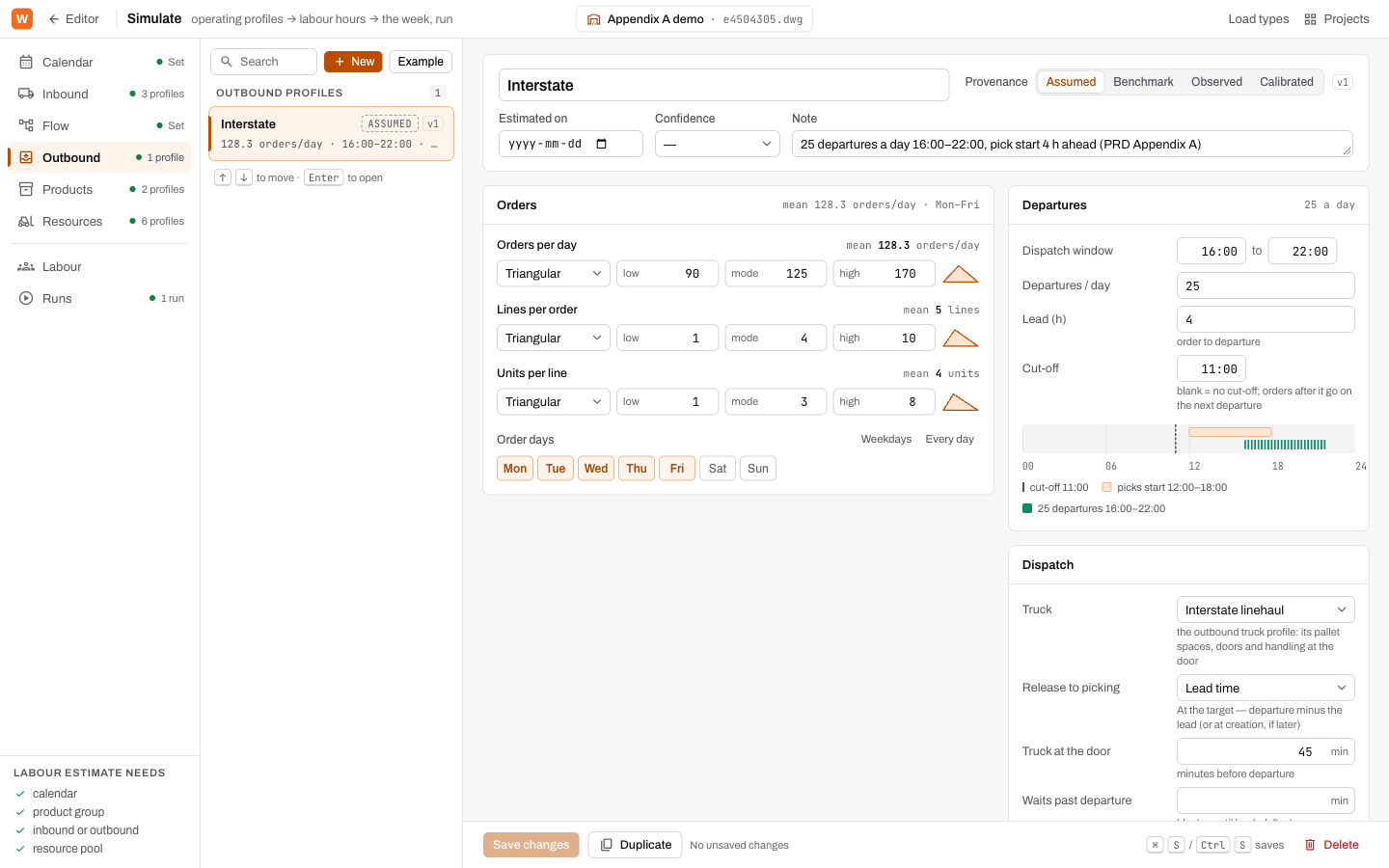
- Orders: Orders per day, Lines per order, Units per line, Order days.
- Departures: the Dispatch window (from and to), Departures / day, the Lead (h) (how long before departure picking should start) and the Cut-off (orders after it go on the next departure). A strip shows the dispatch day: the cut-off, when picking starts, and the departures.
- Dispatch: the Truck profile that carries the orders, when orders are released to picking, Wave times, when the truck is at the door, and how long it waits past departure.
- Mix: the method mix (Pallet pick, Case pick, Each pick) and the product mix.
Release to picking has three choices: at the target (departure minus the lead), at creation (the moment the order exists), or at the next wave time.
Products: product groups
- Pack: Eaches / carton, Cartons / pallet, Carton (kg). The form spells it out: "1 each → × 12 = 1 carton · 9 kg → × 48 = 1 pallet".
- Storage: which storage families it may go in, and its share.
- Stock: Opening stock, Pick-face positions, and Restock at (how empty a pick face gets before it is refilled).
Resources: resource pools
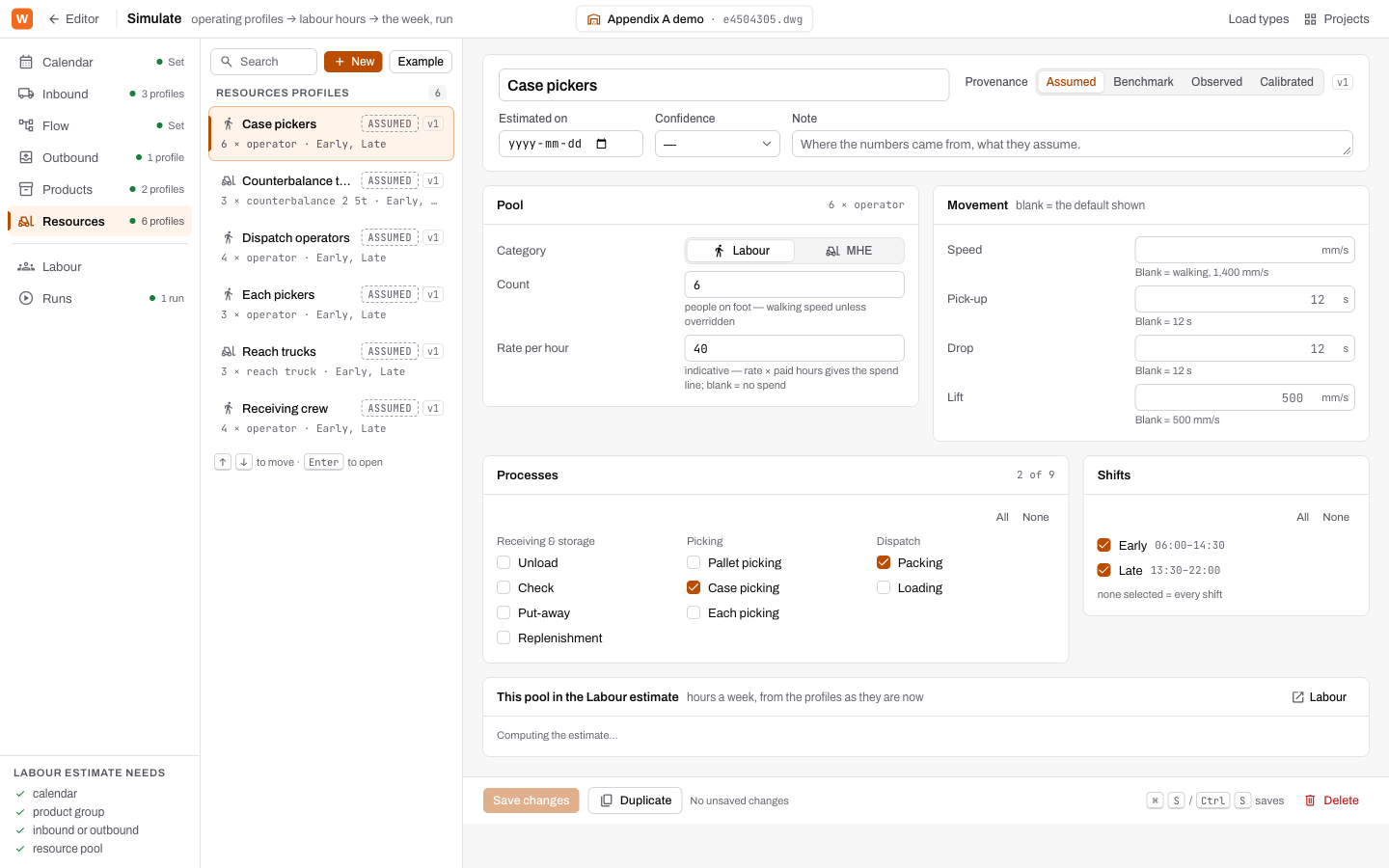
- Pool: Category (Labour or MHE), Count, Vehicle, Rate per hour (for the indicative spend).
- Movement: Speed, Pick-up, Drop and Lift times. Blank uses a stated default.
- Processes: which of the nine processes the pool works: Unload, Check, Put-away, Replenishment, Pallet picking, Case picking, Each picking, Packing, Loading.
- Shifts: which calendar shifts it is rostered on.
- This pool in the Labour estimate: its required and available hours per shift.
Example and Duplicate
Every list has New and Example. Example fills a new profile with sensible starting values, marked assumed. Duplicate on the save bar copies the open one. Save with Save changes, or Ctrl+S / ⌘S.
Try it
In the demo, open each tab in turn and find: the two shifts; the busiest inbound profile; the cut-off time for Interstate; the pack of Fast movers; and which pool does packing.
Words you just learned
Calendar · shift · truck profile · flow · order type · lead · cut-off · release · wave · product group · resource pool · provenance · distribution · hourly profile.